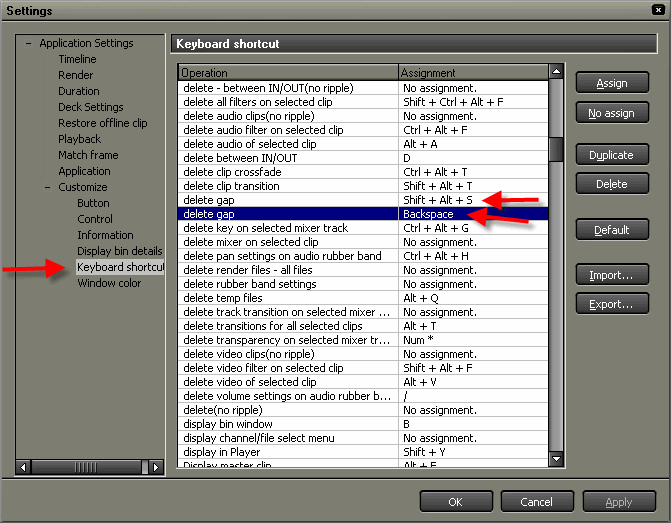
Below is a list of Grass Valley Edius keyboard shortcuts. With KillerKeys, you can always have the shortcuts you want for practically any application right in front of you.
| Modifier Key | Key | Description of shortcut |
| Ctrl Shift | B | Add clip in player to asset bin |
| Shift | F | Search frame - recorder |
| Ctrl Shift | F | Search frame - player |
| F12 | Print to tape | |
| Ctrl | N | New project |
| Ctrl Shift | N | New sequence |
| Ctrl | O | Open project |
| Ctrl Shift | O | Add file to recorder |
| Ctrl Shift | P | Open clip source file |
| Alt | Q | Delete unused rendered files |
| Ctrl | S | Save project |
| Ctrl Shift | S | Save as |
| Ctrl | T | Create new freeze frame |
| Alt | A | Delete audio from selected clip |
| BACKSPACE | Delete gap | |
| D | Delete between in/out | |
| Alt | D | Ripple delete between in/out |
| Delete | Delete | |
| Alt | Delete | Ripple delete |
| Alt Shift | F | Delete parts - video filters |
| Alt Ctrl | F | Delete parts - audio filter |
| Alt Ctrl Shift | F | Delete parts - all filter |
| Alt Ctrl | G | Delete parts - key |
| Alt Ctrl Shift | G | Delete parts - transparency |
| Alt Shift | H | Delete volume setting |
| Alt Ctrl | H | Delete pan settings |
| Alt | T | Delete transition between selected clips |
| Alt Shift | T | Delete parts - transition |
| Alt Ctrl | T | Delete parts - cross fade |
| Alt | V | Delete video of selected clip |
| Shift | 1 | Select 1a track |
| Shift | 2 | Select 2a track |
| Shift | 3 | Select 3a track |
| Shift | 4 | Select 4a track |
| Shift | 5 | Select 1va/v track |
| Shift | 6 | Select 2va/v track |
| A | Previous edit point | |
| END | Move to end | |
| F | Match frame recorder>player | |
| Alt | F | Display master clip |
| F11 | Print to file | |
| HOME | Move to start | |
| Numpad - | Timecode jump (-) | |
| Numpad + | Timecode jump (+) | |
| PgDn | Next edit point - trim | |
| PgUp | Previous edit point - trim | |
| Ctrl | Right Arrow | Next edit point |
| S | Next edit point | |
| Shift | A | Select all tracks |
| Ctrl | A | Select all clips in selected tracks |
Grass Valley Edius Keyboard Shortcuts
![Grass Valley Edius Keyboard Shortcuts]() Reviewed by Black
on
1:10 AM
Rating:
Reviewed by Black
on
1:10 AM
Rating:
Very informative blog thanks for sharing
ReplyDeleteRocks Video Player is more than just a traditional video player for Android. It is an ultra HD video player which comes with a lot of unique features. You can also download subtitles using it. You can easily download music and videos from sites like Vimeo, DailyMotion, Facebook, etc.
This post is very good I am very happy to see this post. Thanks for sharing such a great article. Keep up the work... your site is great, and it's helping us a lot.
DeleteVideo Player App
Ad-Free Video Player
This post is very good I am very happy to see this post. Thanks for sharing such a great article. Keep up the work... your site is great, and it's helping us a lot.
ReplyDeleteHD Video Player App